
Grammarly stands as a widely-used online writing assistant that edits your content while providing stylistic recommendations. The platform features both free and premium versions, available as a web-based tool and downloadable application.
Beyond identifying potential grammar mistakes and structural issues, Grammarly’s sophisticated artificial intelligence delivers context-specific guidance to enhance your written work.
With the Premium version, you can customize settings for your target audience, formality level, domain, tone, and intent before this AI-powered assistant begins editing. The software also includes plagiarism detection capabilities.
However, Grammarly’s Premium subscription costs $25 monthly—significantly more than competing editing tools. Exploring Grammarly alternatives could provide access to enhanced writing features, better academic performance, or substantial cost savings compared to premium membership fees.
Looking for viable Grammarly alternatives? You’ve found the right resource.
Top Grammarly Alternatives
Professional editing proves essential whether you’re submitting academic essays or pursuing opportunities to make money writing online. Here are nine outstanding Grammarly alternatives offering diverse features tailored to specific writing requirements. Identifying your objectives remains crucial when selecting the right alternative.
Small business owners seeking customer engagement might benefit most from platforms specializing in website copywriting. Students aiming for top grades should prioritize tools designed for academic paper evaluation and improvement.
1. Hemingway Editor

The Hemingway Editor functions as an online application providing corrections and suggestions for your written content. While the web version remains completely free, the desktop application requires only a one-time $19.99 payment.
This editing platform highlights different grammar errors using color-coded systems based on mistake types. Monotonous or confusing sentence structures appear highlighted in yellow, while grammatical errors display in blue.
The Hemingway Editor excels for users seeking a straightforward desktop application that delivers writing corrections and style recommendations.
Click Here To Get Started2. ProWritingAid

Dedicated writers seeking skill improvement will find ProWritingAid an ideal solution. This comprehensive tool checks grammar, offers style guidance, and provides valuable resources for long-term writing development.
Adding ProWritingAid to Google Chrome costs nothing, and it integrates seamlessly with Microsoft Word and Google Docs. The grammar and spelling checker costs $20 monthly, though a free version exists. Monthly or annual subscriptions unlock helpful writing resources including articles, instructional videos, and interactive quizzes.
ProWritingAid serves these users well:
- Copywriters
- Authors
- Freelance writers
- Students
3. Ginger

Ginger serves as an online spelling and grammar verification tool. Writers looking to strengthen fundamental grammar or sentence structure abilities will find Ginger an excellent resource.
Through gingersoftware.com, you can paste written content and receive spelling corrections within minutes. Unlike Grammarly’s software application, Ginger operates as a web-based platform available free of charge. However, Ginger lacks plagiarism detection features, making alternative options preferable for writers prioritizing originality verification.
Click Here To Get Started4. WhiteSmoke

WhiteSmoke combines online grammar checking, plagiarism detection, and translation services. Starting at $5 monthly, WhiteSmoke provides access to:
- Grammar checker
- Spell checker
- Style checker
- Punctuation checker
- Translator
Choose WhiteSmoke when seeking high-quality online proofreading with instant suggestions. While similar to Grammarly, WhiteSmoke offers flexible pricing plans with monthly switching options.
This platform corrects written work while providing guidance on improving your writing skills comprehensively. Experience this grammar and spelling checker through their free trial.
Click Here To Get Started5. Readable

Authors, small business owners, and educators will find Readable particularly valuable. Beginning at $4 monthly, Readable extends beyond basic spelling and grammar corrections to offer:
- Text analysis
- Text editor
- URL analysis
- Email analysis
Higher-tier plans unlock advanced features including website scoring and unlimited alerts—ideal for e-commerce or content website operators. Readable excels when your goal involves improving website copy to attract more customers.
Click Here To Get Started6. SentenceCheckup
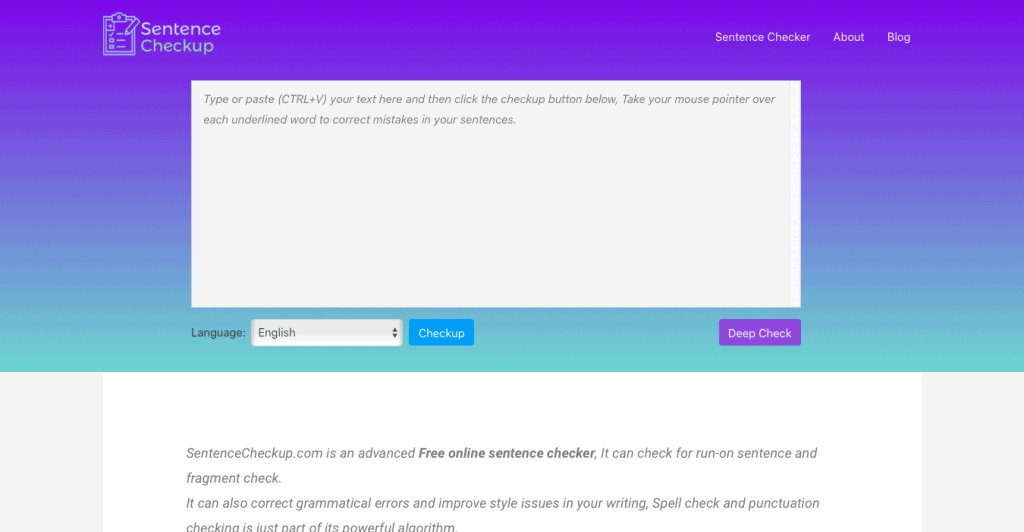
SentenceCheckup operates as a free online sentence verification tool that addresses run-on sentences, fragments, and provides style improvement recommendations alongside basic grammar error corrections.
Writers seeking to enhance essays, blog posts, or articles should utilize SentenceCheckup before publication. This complimentary online checker enables easy content pasting with immediate suggestion display. Compared to Grammarly, SentenceCheckup offers completely free access without requiring desktop installation.
Click Here To Get Started7. Slick Write

Slick Write functions as a free online application helping users follow grammar conventions while improving writing style. Writers, authors, and students will find this user-friendly tool enhances their work within minutes. Unlike Grammarly, this application requires no software installation and remains 100% free.
Click Here To Get Started8. Paper Rater

Students aiming for exceptional grades on assignments will find Paper Rater the ideal platform. Paper Rater examines writing for grammar issues and plagiarism while providing essay-style grading.
Paper Rater includes both free and premium versions, with premium subscriptions costing $14.95 monthly. Students needing plagiarism detection tools combined with writing improvement guidance should choose Paper Rater for overall grade enhancement.
Click Here To Get Started9. LanguageTool

This proofreading solution identifies grammatical, spelling, and style errors across content. As the only writing tool supporting multiple languages, it verifies writing in over 20 different languages. Its natural language processing capabilities detect and correct grammar mistakes in English, French, German, and numerous other languages.
This online editor offers premium plans for students, authors, and freelancers, plus Enterprise solutions for agencies and companies. LanguageTool’s key features include:
- Firefox and Chrome extension add-on
- MS Word, LibreOffice, and Google Docs add-on
- Multiple language support, personal dictionary, and autocorrect
- Suggested correction, keyboard shortcuts, rule-based, and privacy
- Open source online proofreading software for spotting basic grammar errors and other mistakes
Final Thoughts: Top Grammarly Alternatives
These nine platforms will help you evaluate academic essays, create compelling website copy that attracts customers, and verify content for potential plagiarism. Using these tools will polish your writing within minutes. Ensure you maintain a stable internet connection to maximize these platforms’ effectiveness.


